- Blog
- Updates
- How to Stop and Activate Ad Campaigns Automatically?
How to Stop and Activate Ad Campaigns Automatically?
Not always advertisers want their campaigns to be running 24/7 – some need them at a specific time; especially when it comes to special offers or campaigns targeting a particular audience. Because when adapted for preferable time, advertising campaigns are more likely to end in conversions.
Due to the nature of offers or audience, advertisers may expect the highest number of final goals to be reached at a particular time interval. For this reason, they are willing to pay only for the conversions made during this period. And while advertisers want to be able to run campaigns in the most profitable time, they don’t want to spend hours on manual campaigns activation and termination.
But with the automation stepping in, marketers can have campaigns scheduled to the preferred hours through an Offers schedule tool. Offers schedule tool is designed to enable advertisers to start and pause advertising campaigns via a special calendar at the needed time. Users set rules for their offers to be activated and paused at a specific time – once it is done, their campaigns automatically run accordingly.
E.g. User needs to set a rule for an offer to be active from 9 am till 10 pm within working days and from 12 am till 12 pm within weekends. That’s how it looks like:
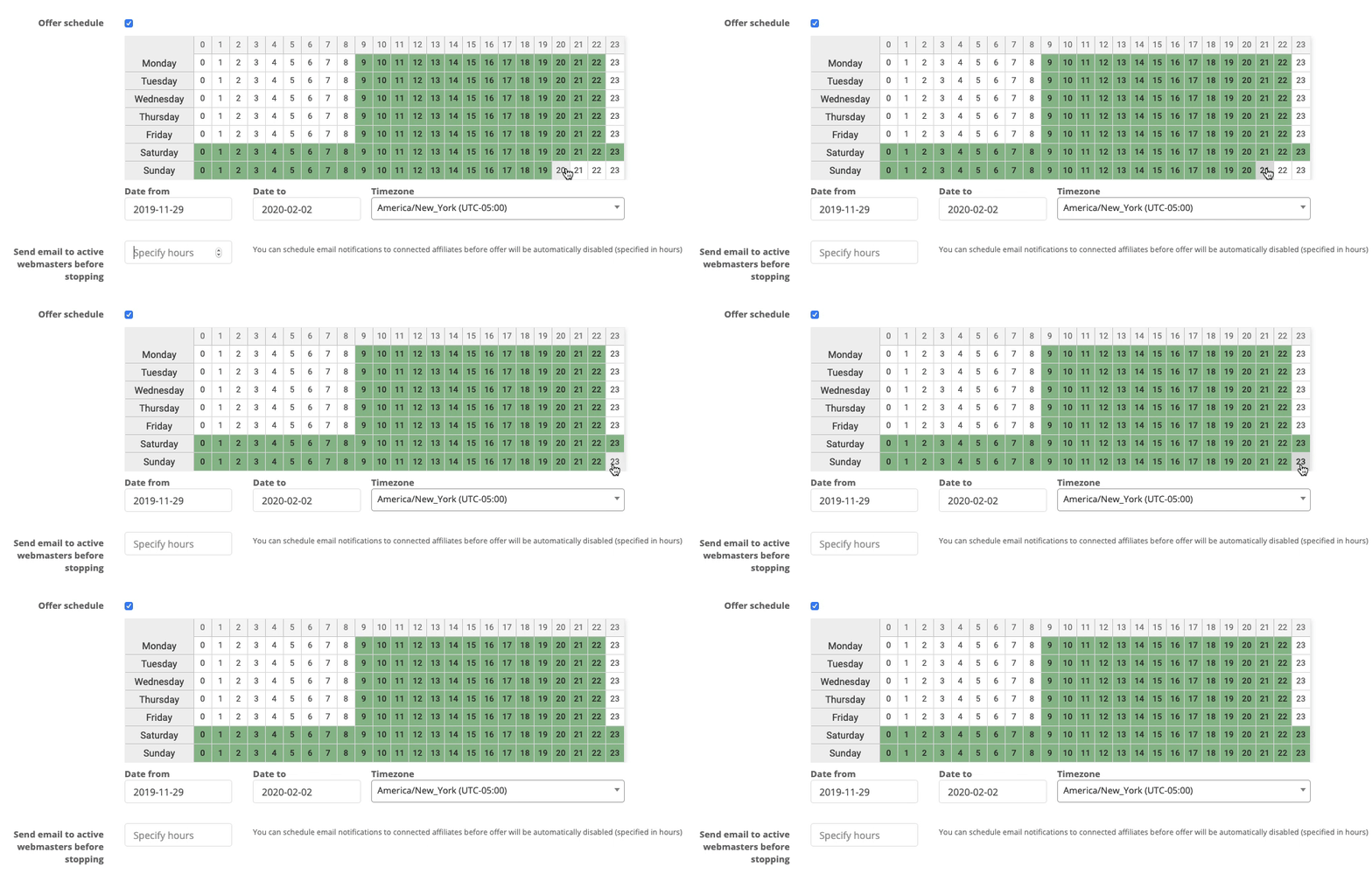
You set Offer Schedule in the General Tab section of a New Offer Setup, it constitutes a calendar with weekdays and hours. Each day has its line of hours, which allows setting different ranges of active hours for every single day of a week.
You choose “Date from” and “Date to” – to mark a launch and completion date; and “Timezone” to activate and stop your offers following the given timezone. Hours during which an offer is active are marked in green, when disabled – in white.
Don’t hold your offers back – automate time regulations for your campaigns!
Should you have any additional questions on how to enable this feature for your campaigns – feel free to contact support@affise.com or ask your Customer Success manager.
Frequently Asked Questions
1. How can I set up a schedule to automatically activate and pause my ad campaigns in Affise?
You can set up automatic activation and pausing through the Offer Schedule feature in the General tab when editing an offer. The calendar lets you click cells to mark active periods in green and paused periods in white. You also need to specify a “Start at” date, an optional “Stop date,” and the correct timezone. For a complete walkthrough of every field and setting, see this detailed offer schedule guide. Once saved, the system checks and adjusts the offer’s status every 30 minutes to match your schedule.
2. What happens if I manually pause a campaign that already has an active schedule rule?
If you manually pause, disable, or change an offer’s status via API or CPAPI while an active period is in force, the system will not immediately override your change. Your new status remains until the beginning of the next active period defined in the schedule. This means your manual pause holds for the remainder of that active window, after which the scheduled rule takes over again. This behavior ensures you retain control during critical moments without fighting the automation. To see how similar automation principles apply at a broader brand level, explore this resource on marketing automation for ecommerce brands.
3. What are the broader benefits of automating campaign activation and pausing for my marketing operations?
Automating campaign timing goes beyond convenience—it directly supports smarter budget allocation and higher conversion rates by ensuring offers run only during the most profitable hours. This kind of automation reduces manual oversight, eliminates human error, and frees your team to focus on strategy rather than repetitive status changes. The same principles apply across broader marketing operations, helping brands scale multiple channels and partnerships without increasing operational chaos. To explore the platform that supports these automation workflows, review this overview of affiliate marketing software. It explains how scheduling, tracking, and optimization tools work together to keep campaigns efficient.
Written by
Affise Academy
Affise is a partner marketing platform for brands, advertisers and agencies to scale via all possible performance marketing channels. Synergy of technology and our long standing experience lets you expand your partnerships, automate every step of the campaign lifecycle and make data-driven decisions.
See all articles →