






Take your app to the next level with Affise MMP (Mobile Measurement Partner)
Join Now ⚡
Events Report: Track Conversions & User Behavior | Affise Events Report: Track Conversions & User Behavior | Affise

Updates — 22 Jul 2026

Affise introduces Events report

  • Blog
  • Updates
  • Get more insights into your campaigns’ performance using the Events report

Get more insights into your campaigns’ performance using the Events report

Nowadays, marketers have learned numerous ways of data tracking. Knowing how your audience interacts with your product/service or its separate elements is crucial. It will help you optimize your users’ experience and improve campaign performance. 

Let’s say you’re promoting a casino’s offer. You’ll probably need to analyze the users’ performance to understand who brings more money than others, who leaves right after registration, how many registrations result in deposits or wins, or simply what specific user’s performance is within different casinos. 

Event tracking is one of the most popular ways of getting more data and making more accurate decisions. You would be surprised how many promising campaigns could be saved by knowing the user’s journey!

In this regard, Affise Performance keeps providing more data analytics opportunities and introduces a new ‘Events’ statistics report.

What is the ‘Events’ report?

The ‘Events’ report is a statistics report which can help you:

  • get a full picture of your audience’s behavior within your product or service;
  • analyze users’ performance by tracking their journey;
  • create high-performing campaigns;
  • improve your marketing performance.

How can I start using the ‘Events’ report?

To use the report on events, follow several easy steps:

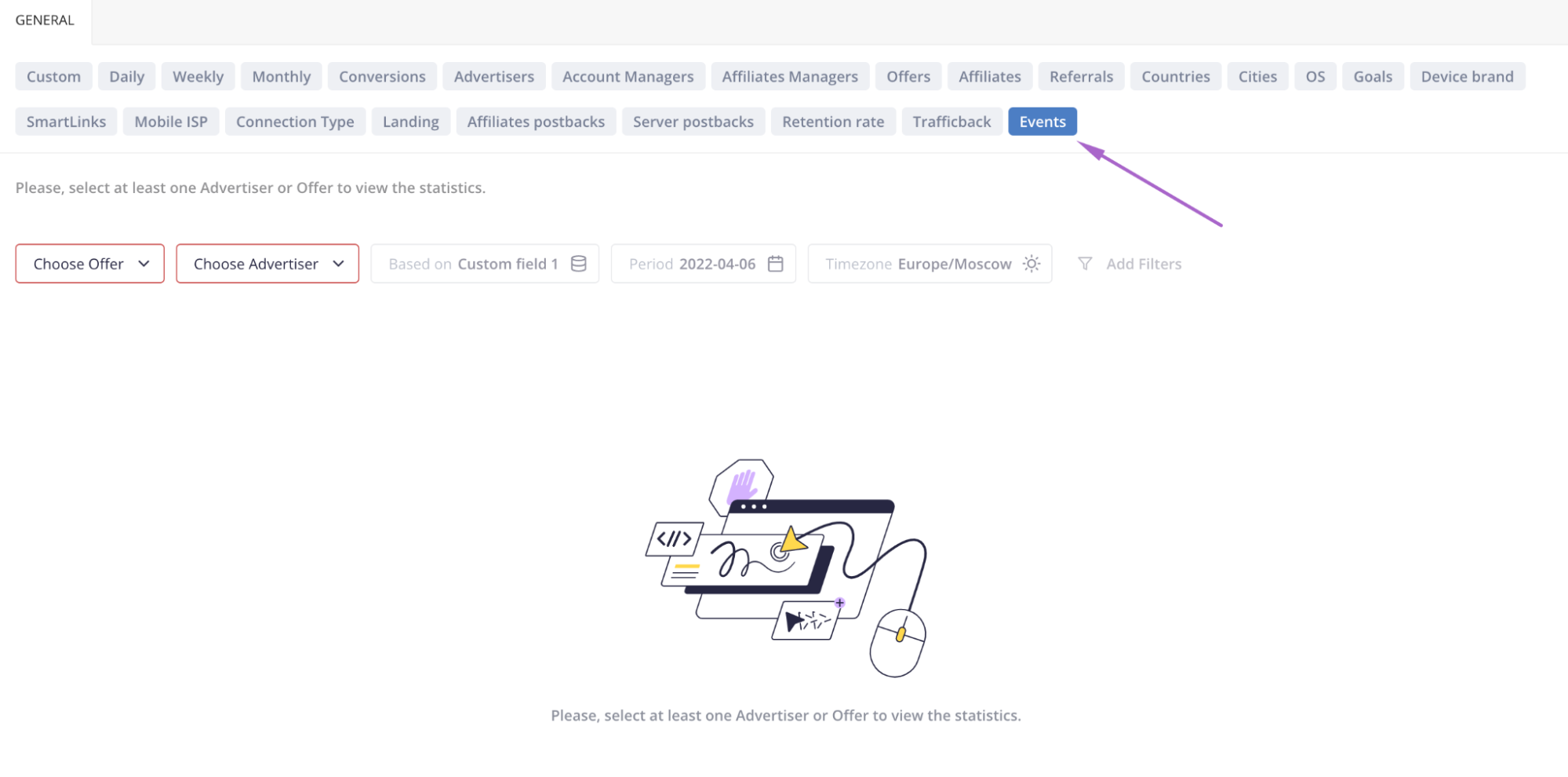
1.Navigate to the ‘Statistics’ section in your Admin panel and find the ‘Events’ statistics slice:

2. Select the Offers or Advertisers you want to create a report for.

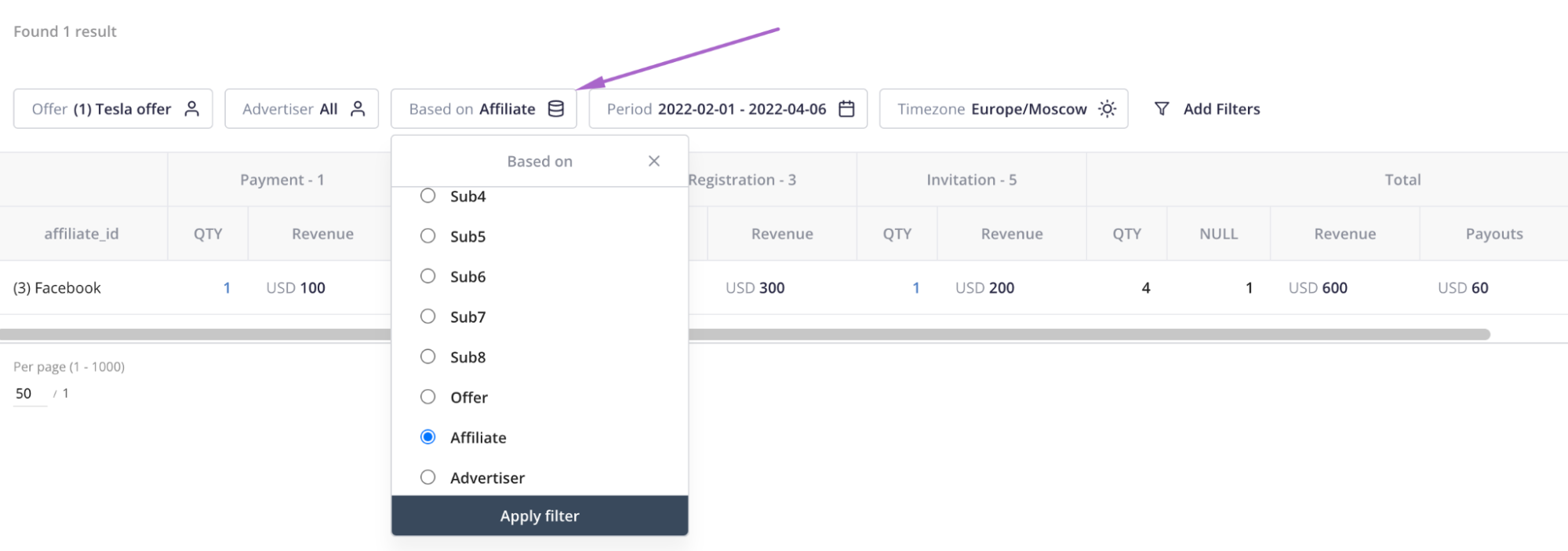
3. Once the Offers or Advertisers are selected, you can also apply additional filters to your report. For instance, you can create a report based on the specific field: Advertiser, Offer, Affiliate, sub-accounts, or custom fields.

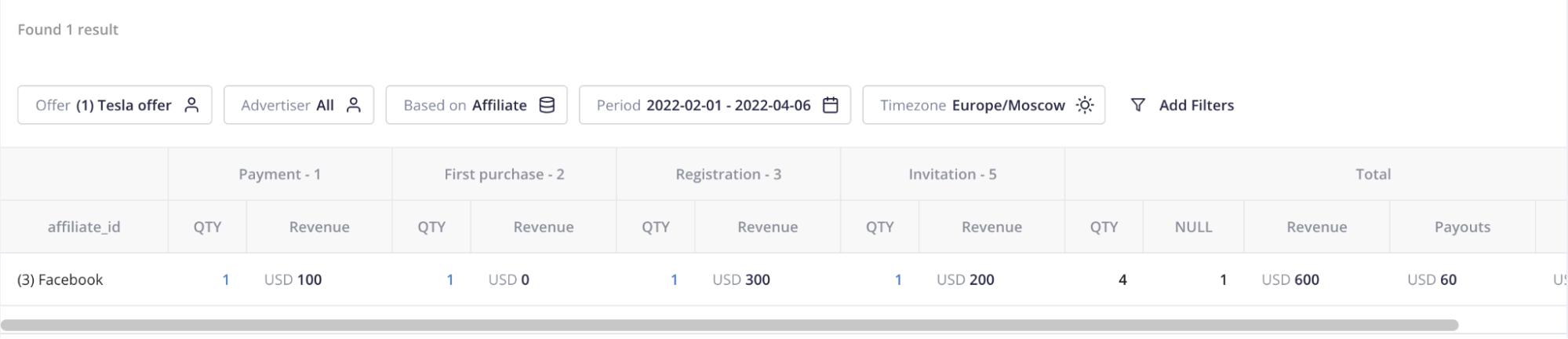
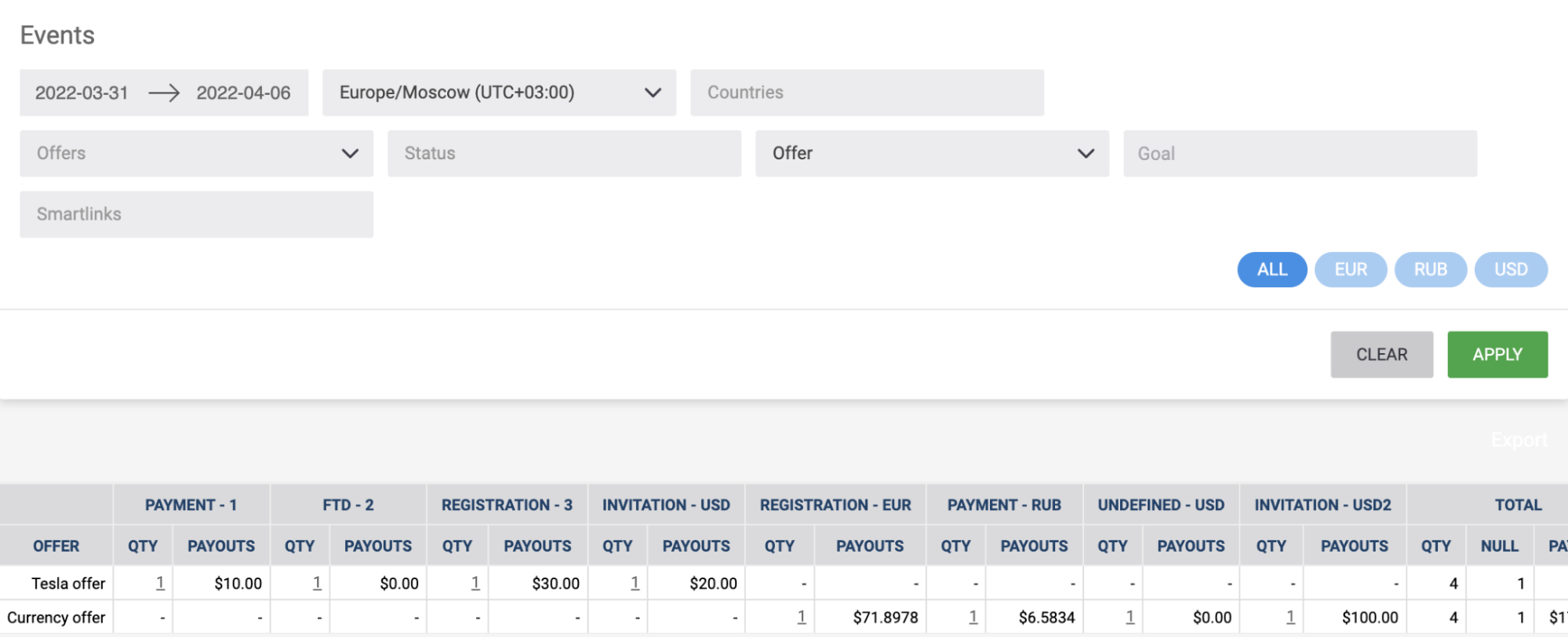
4. When required and additional filters are applied, you will see the statistics table with the data grouped by the field selected within the ‘Based on’ filter and events found by the system in the chosen Offers or Advertisers. Let’s take the statistics table below:

The report is based on ‘Affiliate’, so now we can view how many conversions of the displayed Affiliate have resulted in specific  events: Payment, First Purchase, Registration, and Invitation. Also, we can see how many conversions and revenue each event has brought.

Can I share the ‘Events’ report with my affiliates?

The simple answer is yes. The ‘Events’ report is available for your affiliates in their Affiliate’s panel within the Statistics section:

However, you might not want to share some specific data you receive from your Advertiser via custom_fields within your postback URL. In this case you can restrict your affiliates from viewing this sensitive data. Just disable the ‘Show custom fields at the Events statistics report’ setting at the Affiliate’s general settings of your Admin panel (Settings -> Affiliates -> General):

To sum it up

Use the ‘Events’ statistics report if you strive to have an absolutely new level of insight into your audience’s behavior. Any event can be a revenue-impacting action. Understanding these events will help you improve your campaign’s performance and make users do what you want them to do. Just build your event report in a way you see and understand it and make the right decisions.

Frequently Asked Questions

1. What is the purpose of the Events report in Affise Performance, and what data does it track?

The Events statistics report in Affise Performance provides comprehensive visibility into user journeys by tracking specific conversion events such as registrations, first purchases, deposits, and payments. By aggregating performance metrics across chosen advertisers, offers, and affiliates, marketers can accurately evaluate which partner activities yield high-value audience actions. Understanding these granular user interactions empowers businesses to make data-driven decisions that optimize campaign ROI and overall marketing strategy. If you want to explore more strategies for optimizing your performance marketing campaigns, feel free to visit the Affise performance marketing blog for ongoing industry insights and updates. This deep level of behavioral data ensures you never miss critical steps in your sales funnel.

2. How can administrators set up and generate an Events report in their Admin panel?

Generating an Events report is a straightforward process managed directly through the Statistics section of the Affise Admin panel. Administrators simply navigate to the ‘Events’ statistics slice, where they can select the specific Offers or Advertisers they wish to analyze. Additional custom filters can then be applied to segment performance data by parameters such as Affiliates, sub-accounts, or custom fields. The platform generates a clear statistics table grouped by the selected dimensions, displaying total conversions, revenue, and specific event actions like payments or invitations. You can review our flexible subscription tiers on the Affise plan pricing page to determine which package includes these advanced reporting capabilities. This customizable grouping allows marketers to tailor reports precisely to their strategic operational requirements.

3. Can affiliates see the Events report, and how can sensitive custom data be protected?

Yes, affiliates can access the Events report directly within their dedicated Affiliate panel under the Statistics section to monitor their conversion events. However, if your campaigns pass sensitive proprietary information from advertisers through custom fields in postback URLs, you can easily restrict affiliate access. Program managers can prevent custom fields from being exposed by toggling off the ‘Show custom fields at the Events statistics report’ option in the general affiliate settings. Protecting sensitive advertiser data while maintaining transparency helps build strong, trusted partnerships that drive sustainable growth. To see real-world examples of how businesses successfully manage partner relationships and scale campaign results, browse our collection of Affise customer success stories. This control ensures you balance transparency with data privacy effectively.

Your company is searching for a full technology stack to drive affiliate business?

Share this article
Affise Academy

Written by

Affise Academy

Affise is a partner marketing platform for brands, advertisers and agencies to scale via all possible performance marketing channels. Synergy of technology and our long standing experience lets you expand your partnerships, automate every step of the campaign lifecycle and make data-driven decisions.

See all articles →


Sign up to receive our newsletter

Stay on top of the competition. Let us keep you updated with news, insights, and more

email envelope