



Take your app to the next level with Affise MMP (Mobile Measurement Partner)
Join Now ⚡
Unlock the Full Potential of Your Affiliate Marketing with Affise's View-Through Attribution (VTA) Unlock the Full Potential of Your Affiliate Marketing with Affise's View-Through Attribution (VTA)

  • Blog
  • Tips & Guides
  • Unlock the Full Potential of Your Affiliate Marketing with Affise’s View-Through Attribution (VTA)

Unlock the Full Potential of Your Affiliate Marketing with Affise’s View-Through Attribution (VTA)

Are you maximizing your affiliate marketing impressions? With Affise’s View-through Attribution (VTA), you can convert every impression into measurable, actionable insights, optimizing your affiliate marketing strategy like never before.

In today’s competitive digital marketing landscape, understanding every customer touchpoint is crucial. VTA provides a holistic view of your campaign performance, ensuring you properly value the channels that build brand awareness and influence conversions.

What is View Through Attribution?

View Through Attribution tracks conversions influenced by ad impressions, not just direct clicks. It ensures you capture the real value of your marketing activities, recognizing that customers often convert after initially viewing an ad, even if they don’t click right away. VTA reveals the hidden impact of display advertising, making your campaigns smarter and more efficient.

How Does View Through Attribution Work on Affise?

Follow these simple steps to leverage VTA:

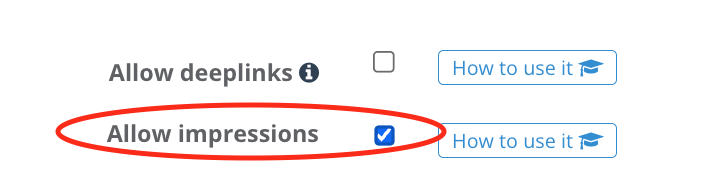
  1. Enable Impression Tracking:
    • Navigate to your Affise offer settings and activate the “Allow Impressions” option under the Tracking section. This will show impression endpoint in your affiliate account.
Enable Impression Tracking
  1. Set Up Advertiser Integration:
    • Input the advertiser’s impression tracker URL into the Impressions Destination URL field under Offer → Tracking. Use Affise’s {aimp_id} macro to pass impression IDs seamlessly.

Advertiser Integration
  1. Install Affise Postback URL:
    • Configure Affise postback on the advertiser’s side, including the parameter &aimp_id= to track impression-based conversions accurately.

Benefits of Using VTA with Affise

  • Improved Attribution Accuracy: Affiliates receive proper credit even without immediate clicks.
  • Deeper Marketing Insights: Better understand the true impact of your display and retargeting ads.

Get Started with VTA Today

The View-through Attribution feature is available with select Affise plans. Unsure if your current plan includes VTA? Contact your Affise account manager or our dedicated support team at support@affise.com.

Ready to Boost Your Affiliate Marketing Results?

Activate Affise’s View Through Attribution today and unlock the full potential of your marketing efforts!

Learn more about Affise’s VTA feature here.

Frequently Asked Questions

1. What is View Through Attribution?

View Through Attribution (VTA) is the proccess of tracking conversions influenced by ad impressions rather than requiring direct clicks, capturing the value of display ads that build brand awareness. It helps marketers understand customer touchpoints holistically, even when users convert later without clicking. For deeper insights into attribution models like last-touch, check out Affise’s guide on tracking and attribution in affiliate marketing.

2. How do I set up VTA in Affise?

To implement VTA, you must first enable impression tracking within the specific offer’s settings.

  • Enable Impressions: Go to the Tracking tab in the offer’s edit page and activate the “Allow impressions” option.

  • Impressions Destination URL: Add the advertiser’s impression link in the designated field. Append the {aimp_id} macro to this URL to pass the unique Affise impression identifier to the advertiser.

  • Postback Setup: For accurate attribution, the advertiser must send this identifier back to Affise in the postback URL using the &aimp_id= parameter.

  • Attribution Window: Use the “Click & Impression session lifespan” settings to define the lookback window (typically 24 hours to 7 days) during which an impression can be credited for a conversion.

3. Which Affise plans include VTA?

VTA is a specialized feature often tied to specific usage limits or platform products:

  • Included Impressions: Most standard Affise Pricing Plans (Beginner, Core, Expand) include a set volume of impressions (e.g., 5M to 20M per month), but the VTA feature itself may require specific activation.

  • Product Tiers: Advanced attribution features like VTA are core components of Affise Performance and Affise MMP.

  • Confirmation: Because specific features can vary by contract, contacting your account manager or support@affise.com is the standard way to verify VTA’s availability for your specific plan.

Share this article
Dmitry Hodosok

Written by

Dmitry is a product manager with an interest in technology and affiliate marketing. He is passionate about improving products through a customer-centric, data-driven approach. In his free time, he enjoys traveling and reading.


Sign up to receive our newsletter

Stay on top of the competition. Let us keep you updated with news, insights, and more

email envelope