







Take your app to the next level with Affise MMP (Mobile Measurement Partner)
Join Now ⚡
Affiliate Management | Team Oversight Made Scalable in Affise Affiliate Management | Team Oversight Made Scalable in Affise

  • Blog
  • Tips & Guides
  • How to Manage Affiliate Teams in Affise: A Game-Changer for Agencies and Media Buyers

How to Manage Affiliate Teams in Affise: A Game-Changer for Agencies and Media Buyers

The Challenge: Managing a Media Buying Team

Agencies and media buying teams often consist of multiple traffic managers working under a single team lead or manager. However, without a centralized way to monitor all team members, managers must collect data manually or log in to each account separately – a disastrous process in the fast-paced reality of media buying nowadays.

The role of a team manager in media buying is unique. They are neither a traditional affiliate manager nor a standard affiliate. They need the ability to monitor performance without unnecessary access to the broader admin functionalities of an affiliate network. Many platforms fail to address the specific needs of this role, making effective management a challenge.

The Solution: Affiliate Teams Management

Affise now enables Affiliate Teams Management, allowing a Manager Account to oversee multiple Team Members seamlessly. Designed specifically for media buying workflows, this feature provides the right balance of control and security.

Key Benefits for Managers

  • Analyze Performance Metrics for Each Team Member: Monitor stats across different metrics, compare day-to-day performance, and identify trends.
  • Quick Team Member Onboarding: Generate and share an invitation link to instantly add new team members.
  • Efficient Moderation and Control: Temporarily pause traffic from underperforming team members or adjust strategy as needed.
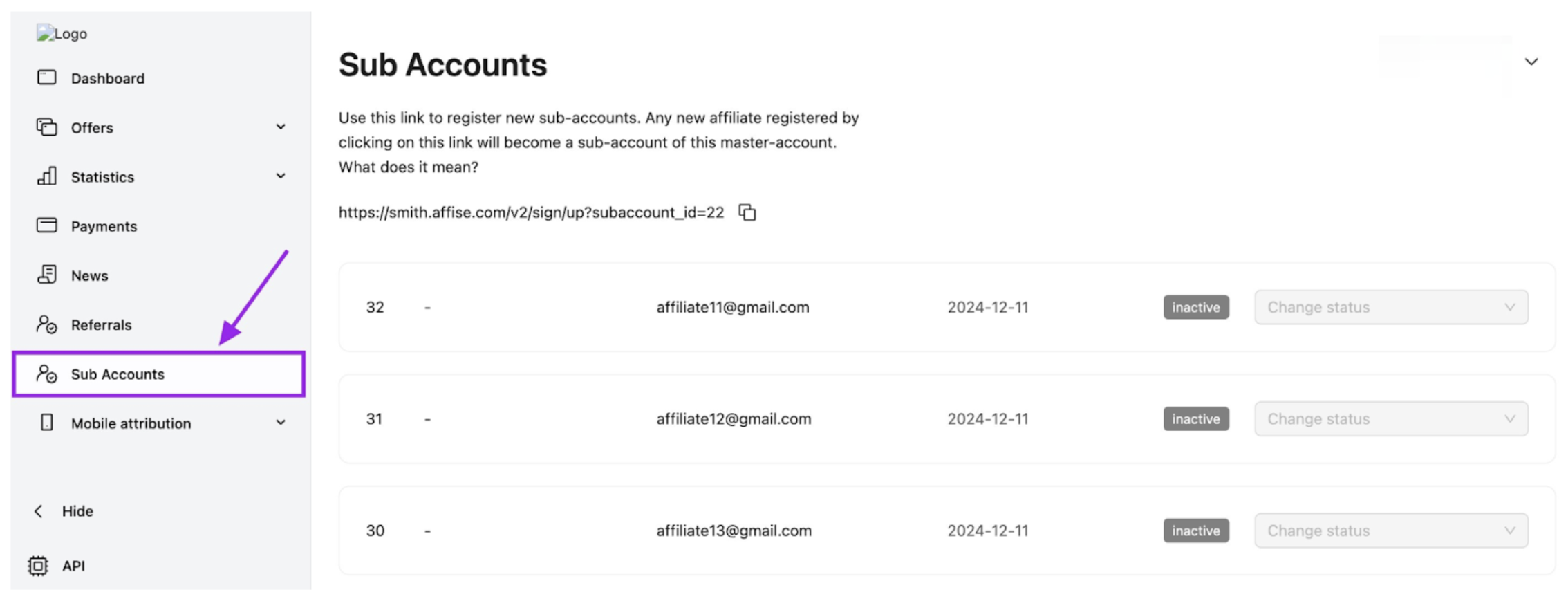
sub-accounts

How To Manage A Team of Affiliates in Affise

1. Accessing the Affiliate Teams Menu

Navigate to the Partner Panel and find the Affiliate Teams section in the menu.

2. Generating an Invitation Link

  • On the Affiliate Teams page, locate the invitation link.
  • Share it with new team members who need access.
  • Any affiliate registering via this link will be automatically added as a Team Member.

3. Viewing and Managing Team Members

The Affiliate Teams page provides a detailed list of all team members, including:

  • Registration Date: The date the team member’s account was created.
  • Affiliate Name & Email: Contact details for easy communication.
  • Status: Displays whether the account is Active, Banned, or On Moderation.

Managers also have the ability to block or pause team members instantly, ensuring quick responses to performance shifts.

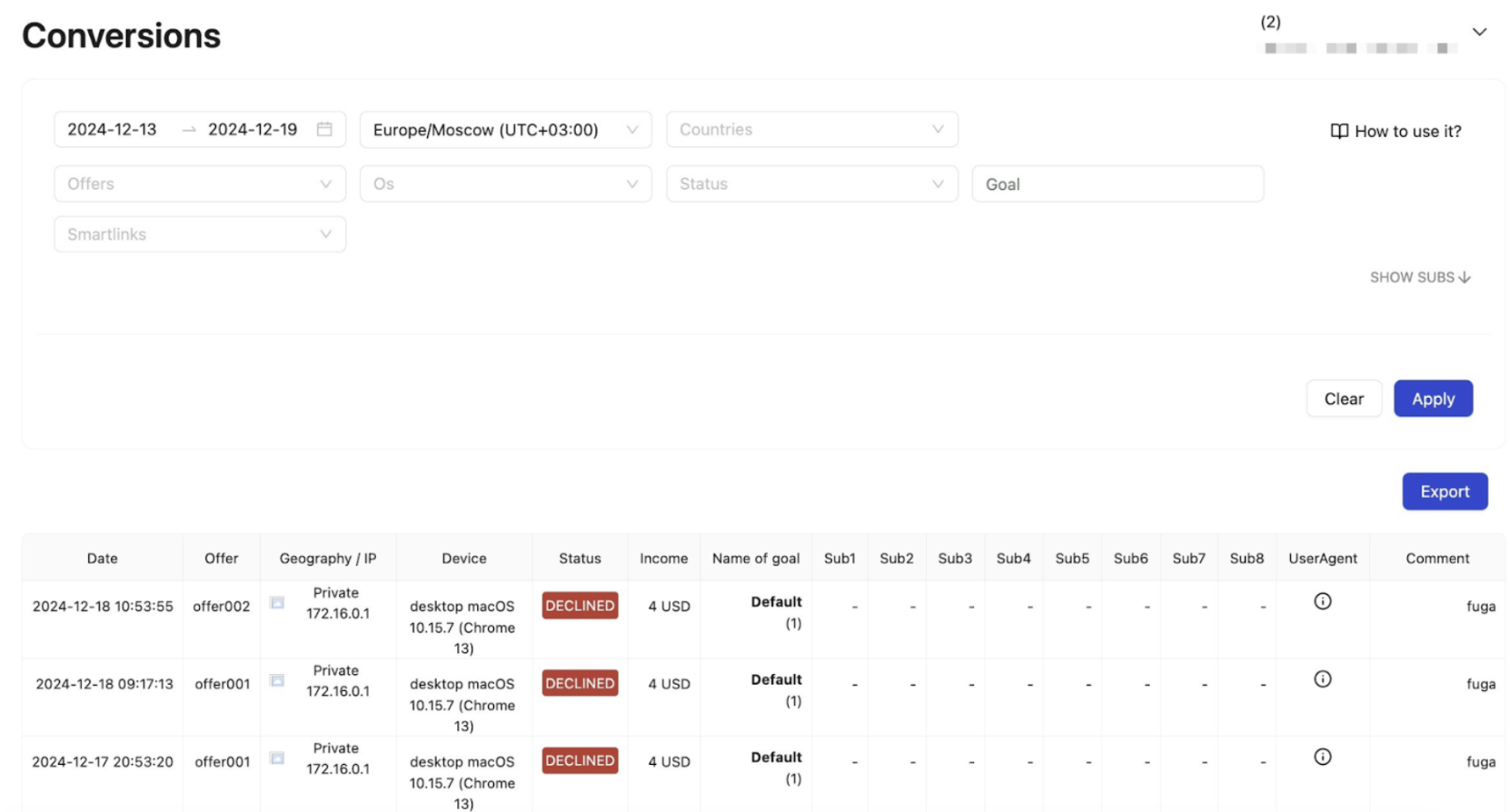
Flexible Analytics for Data-Driven Decisions

A team manager needs clear, actionable insights to optimize performance. With Affiliate Teams in Affise, you can track:

Performance & Revenue Metrics

  • Total Revenue & Profit – Overall revenue and net profit per team member.
  • ROI (Return on Investment) – Measures profitability of each traffic manager’s campaigns.
  • EPC (Earnings Per Click) – Determines average revenue per click.
  • Conversion Rate (CR) – Percentage of clicks that result in conversions.
  • Cost per Acquisition (CPA) – Cost per successful conversion.

Traffic & Engagement Metrics

  • Clicks & Impressions – Tracks volume of user engagement with ads.
  • CTR (Click-Through Rate) – Percentage of users clicking on an ad.
  • Time to Conversion – Average time from click to conversion.

Quality & Fraud Detection Metrics

Operational & Workflow Metrics

  • Daily Spend & Budget Pacing – Ensures traffic managers stay within allocated budgets.
  • Offer & GEO Performance – Measures success rates for different offers and geographies.
  • Individual Team Member Performance Trends – Tracks trends and identifies inconsistencies.
conversions

Real-World Impact: How Affiliate Teams Have Transformed Media Buying Operations

Case Study: Agency Efficiency Boosted

A leading media buying agency struggled with managing multiple team members across separate accounts. After switching to Affiliate Teams in Affise, managers could assess performance in real-time, enabling better traffic allocation and a 8.36% improvement in ROI.

Success Story: E-Commerce Growth

An e-commerce performance marketing team used Affiliate Teams to track ad spend and conversion rates for different team members. By dynamically reallocating budgets based on real-time insights, they achieved an 11.76% increase in campaign efficiency within just one month.

With this powerful new feature, Affise transforms team management, giving agencies, networks, and media buyers the control and efficiency they need to scale their operations effortlessly. Get started today and streamline your affiliate team’s workflow!

Frequently Asked Questions

1. How does Affiliate Teams Management differ from standard affiliate account management?

Affiliate Teams Management is specifically designed for media buying agencies and teams that operate differently from traditional affiliate setups. While standard affiliate accounts are individual and isolated, the Teams feature allows a Manager Account to oversee multiple Team Members from a single dashboard, providing centralized performance analytics without granting unnecessary administrative access. This structure is ideal for agencies where team leads need to monitor traffic managers’ performance in real-time. If you’re looking to build a more comprehensive affiliate program structure from scratch, you might find our guide on how to create a successful affiliate program in 8 steps particularly valuable for establishing the foundational framework.

2. What metrics should I prioritize when monitoring my media buying team’s performance?

The article outlines several critical metrics including ROI, EPC (Earnings Per Click), Conversion Rate, CPA, and bot detection rates. However, the key is not just collecting data but identifying anomalies and trends quickly. For instance, sudden drops in conversion rates or spikes in fraudulent clicks can indicate issues that need immediate attention. To dive deeper into performance optimization strategies and learn how to spot underperforming affiliates instantly, check out our detailed post on how to identify low-performing and top-performing affiliates 10x faster using our new visual performance reports.

3. Can Affiliate Teams Management scale as my media buying business grows?

Absolutely. The feature is built with scalability in mind—whether you’re managing 5 traffic managers or 50, the centralized dashboard eliminates the need to log into individual accounts. The invitation link system allows for instant onboarding of new team members, and the moderation controls let you pause or block underperforming members without disrupting overall operations. For agencies looking to scale beyond their current capacity, we recommend exploring our comprehensive strategies on how to scale your media buying business, which covers everything from human resource management to advanced technological integration for sustainable growth.

Share this article
Elijah Smetanin

Written by

Elijah is an experienced Product Manager with a deep passion for technology and innovative solutions. With a strong background in B2B SaaS and affiliate marketing, he excels at transforming complex ideas into actionable strategies that boost business growth. Elijah is driven by his love for state-of-the-art technology and enjoys discussing topics like AI, VR/AR, and sustainability.

Sign up to receive our newsletter

Stay on top of the competition. Let us keep you updated with news, insights, and more

email envelope